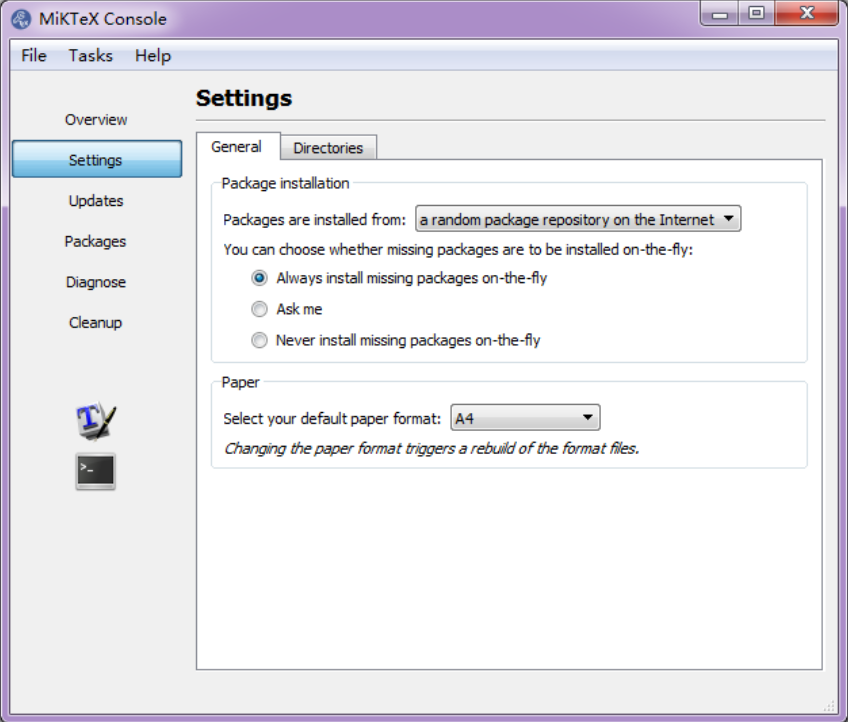
While debugging the rmarkdown issue #1285, I discovered that MiKTeX might fail to install missing LaTeX packages in certain cases. The default behavior of MiKTeX is to ask you whether you want to install missing LaTeX packages, but it may fail to pop up the dialog box to ask you in the first place. I’m still not sure why it could fail (I feel when MiKTeX is installed by the system admin, it may fail to pop up the dialog), but you can change the default setting and let MiKTeX install the missing LaTeX packages without asking. In the MiKTeX Console (you can find it from the Start menu on Windows), choose “Always install missing packages on-the-fly”:
From the viewpoint of the developer, it is absolutely the right thing to do to ask users before installing the missing LaTeX packages. However, from the viewpoint of users, I guess 99.99% of users will agree to install the missing packages. What would you do otherwise in this case? Just stare at the screen, let LaTeX fail, and feel the miserable life? I don’t think you want to do that. Convenience outweighs the potential risk of letting certain software install (random) packages automatically in this case.
The rmarkdown bug #1285 once again confirmed that TinyTeX could be a better option than MiKTeX on Windows. Although it was not MiKTeX’s fault in this case, MiKTeX’s pdflatex fails when called via system2('pdflatex', 'test.tex', stdout = FALSE) in the R console in RStudio, even though system2('pdflatex', 'test.tex') succeeds, which is a really weird bug that took me a long time to realize. By comparison, TinyTeX’s pdflatex works just fine.
Donate
As a freelancer (currently working as a contractor) and a dad of three kids, I truly appreciate your donation to support my writing and open-source software development! Your contribution helps me cope with financial uncertainty better, so I can spend more time on producing high-quality content and software. You can make a donation through methods below.
-
Venmo:
@yihui_xie, or Zelle:xie@yihui.name -
Paypal
-
If you have a Paypal account, you can follow the link https://paypal.me/YihuiXie or find me on Paypal via my email
xie@yihui.name. Please choose the payment type as “Family and Friends” (instead of “Goods and Services”) to avoid extra fees. -
If you don’t have Paypal, you may donate through this link via your debit or credit card. Paypal will charge a fee on my side.
-
-
Other ways:
WeChat Pay (微信支付:谢益辉) Alipay (支付宝:谢益辉) 

When sending money, please be sure to add a note “gift” or “donation” if possible, so it won’t be treated as my taxable income but a genuine gift. Needless to say, donation is completely voluntary and I appreciate any amount you can give.
Please feel free to email me if you prefer a different way to give. Thank you very much!
I’ll give back a significant portion of the donations to the open-source community and charities. For the record, I received about $30,000 in total (before tax) in 2024-25, and gave back about $15,000 (after tax).