Update (2017/08/16): It is much easier to fix typos on my web pages now. There is a menu item “Edit this page” on each page. You can edit the source of a page if you find any mistakes, and propose a correction through a GitHub pull request. You don’t need to use any command-line tools. You should not follow the instructions in the post below any more (the knitr documentation has been moved to a different repo).
So I just got yet yet another comment saying “you have a typo in your documentation”. While I do appreciate these kind reminders, I think it might be a good exercise for those who want to try GIT and GitHub pull requests, which make it possible for you to contribute to open source and fix obvious problems with no questions being asked – just do it yourself, and send the changes to the original author(s) through GitHub.
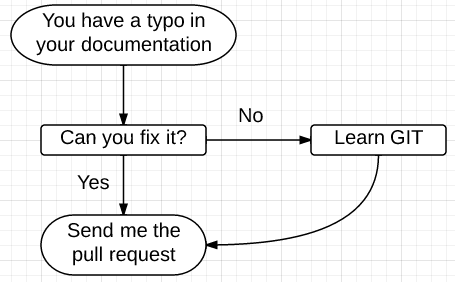
The official documentation for GitHub pull requests is a little bit verbose for beginners. Basically what you need to do for simple tasks are:
- click the
Forkbutton and clone the repository in your own account; - make the changes in your cloned version;
- push to your repository;
- click the
Pull Requestbutton to send a request to the original author;
For trivial changes, sometimes I accept them on my cell phone while I’m still in bed. No extra communication is needed.
Occasionally I see reports of this kind of trivial documentation changes in the R-devel mailing list, and I believe that is just horribly inefficient. You could have done this quietly and quickly, and the developers could have merged the changes with a single mouse click. (Oh, okay, well, you know, SVN, mailing lists, …)
For the knitr repository, it has two
branches: master and gh-pages. The R package lives in the master
branch, and the knitr website lives in the gh-pages branch. If you
want to fix any problems in the website, just check out the gh-pages:
git checkout gh-pages
All pages were written in Markdown, so edit them with your favorite text
editor. For example, as the above comment pointed out, I omitted a right
parenthesis ) in _posts/2012-02-24-sweave.md, and you just add it, save
the file, write a GIT commit message, push to your repository and send the
pull request.
I know I can do this by myself in five seconds, and it takes me way more time to write this blog post, but I just want everybody to know how people with different skill levels can play their roles in software development.
Let’s see how many minutes it takes for the pull request to come after I publish this blog post. Hurry!! :)
Donate
As a freelancer (currently working as a contractor) and a dad of three kids, I truly appreciate your donation to support my writing and open-source software development! Your contribution helps me cope with financial uncertainty better, so I can spend more time on producing high-quality content and software. You can make a donation through methods below.
-
Venmo:
@yihui_xie, or Zelle:xie@yihui.name -
Paypal
-
If you have a Paypal account, you can follow the link https://paypal.me/YihuiXie or find me on Paypal via my email
xie@yihui.name. Please choose the payment type as “Family and Friends” (instead of “Goods and Services”) to avoid extra fees. -
If you don’t have Paypal, you may donate through this link via your debit or credit card. Paypal will charge a fee on my side.
-
-
Other ways:
WeChat Pay (微信支付:谢益辉) Alipay (支付宝:谢益辉) 

When sending money, please be sure to add a note “gift” or “donation” if possible, so it won’t be treated as my taxable income but a genuine gift. Needless to say, donation is completely voluntary and I appreciate any amount you can give.
Please feel free to email me if you prefer a different way to give. Thank you very much!
I’ll give back a significant portion of the donations to the open-source community and charities. For the record, I received about $30,000 in total (before tax) in 2024-25, and gave back about $15,000 (after tax).